

Apple’s new iOS 26 marks a milestone in the company’s mobile operating system evolution as the mobile giant has taken steps to transform the overall user experience of its devices.
Released on Monday, September 15, 2025, it introduces a sweeping redesign and a range of features that depart from Apple’s established traditions.
The most notable change is in the version numbering strategy, as Apple moves away from a traditional sequential numbering scheme toward year-based naming.
Rather than following up iOS 18 with 19, the number now reflects the 2025-26 release period with a “26.”
This change unifies the numbering across all Apple platforms (iOS, iPadOS, macOS, watchOS, and tvOS), aiming to establish a less confusing, more consistent ecosystem.
In this comprehensive guide, we will examine all the other major changes and new features offered with iOS 26.
“Liquid Glass” Visual
The iOS 26 release offers the most transformative visual redesign since iOS 7, known as “Liquid Glass.” It introduces a design language set to shape the future of iOS for the next decade.
The new look brings focus to on-screen content, making the entire operating system feel alive. This aesthetic affects everything from app icons and menu bars to navigation and interactive controls.

Apple describes Liquid Glass as a translucent material that naturally draws your eye to the content on your screen by subtly adjusting its surroundings.
But it’s more than simple transparency; this intricate design refines motion and depth by incorporating dynamic touches such as elegantly presented pop-out menus, navigation bars that recede when not needed, and a softer feel throughout the interface.
The design is meant to look and behave like real glass, complete with reflections and light shifts that respond to the iPhone’s movements.
This lifelike effect, powered by real-time rendering, allows highlights and shadows to react instantly to movement, making the interface feel more tangible and immersive.
Many interface elements now appear translucent, permitting background colors and light to softly pass through, connecting different areas of the interface and giving the screen a cohesive, fluid appearance.

Liquid Glass dynamically adapts to what is being viewed. Bright content appears lighter, while darker screens deepen the tones, maintaining a visually balanced and harmonious viewing experience.
Most interestingly, the influence of the Liquid Glass design is present across all of Apple’s built-in apps, notifications, the Control Center, and both the Lock Screen and Home Screen, ensuring a consistent experience across the board.
Beyond that, Apple has also provided developers with tools to use Liquid Glass in their own apps, allowing third-party software to visually blend with Apple’s native design language and maintain a cohesive aesthetic across the platform.
Of course, Liquid Glass is more than a mere visual refresh. It introduces refined designs for controls, toolbars, and navigation elements.

App windows, menu bars, and other components now feature cleaner, more pronounced rounded corners. Controls and buttons appear to float slightly over the apps, giving them a distinct depth and layered look. These dynamic elements shift and adapt as users interact with them, reinforcing Apple’s new fluid, responsive design.
Despite the dramatic aesthetic shift, Apple has preserved the familiar nature that has worked well and the intuitive feel that users have come to expect from previous iOS versions.
App icons now appear as layered pieces of glass, adding a soft three-dimensional look while keeping their recognizable shapes. Users can also choose translucent icons, allowing the background colors and light to subtly shine through, making the entire display feel like a smooth, continuous sheet of glass.
Lock Screen Personalization
Apple’s iOS 26 has great news for users who have ever wanted the iPhone’s lock screen to feel more lively and personal.
The new system offers a highly dynamic, customizable experience, giving users far more control over the visuals and functionality of their device’s entry point, transforming static displays into dynamic, interactive, and deeply personal canvases.

For instance, the clock now automatically adjusts its position and size based on wallpaper and notification elements, making everything feel balanced and easily readable.
It can even be manually resized, such as being set to a dramatically large format that blends with the background, sometimes partially receding behind certain wallpaper parts to create a realistic sense of depth.
This manual sizing transforms the Lock screen from a mere wallpaper into a personalized, stylistic interface, making it uniquely tailored for each user.
But the clock isn’t the only way iOS 26 makes the lock screen more personal. There are new ways to customize wallpapers and widgets as well.
The latter can now be moved from the top to the bottom of the screen, allowing more control over where important information and shortcuts appear. Apple also added “3D Spatial Scenes” for some visual flair.
This feature turns certain photos into animated wallpapers that shift as the iPhone is moved. The visual enhancements also extend to Apple Music users, who will see full-screen animated album art on their lock screen while playing tracks.
A Smarter, More Stylish Home Screen
With the new, elegant Liquid Glass redesign, the home screen (a user’s main space for interacting with apps) has been significantly overhauled in iOS 26.
One particular standout feature is the new icon customization option. Instead of being limited to light or dark mode, there is now an option for a “clear” icon style that makes app icons subtly translucent.

This creates the illusion that the apps are made of layered glass, floating above the wallpaper. This results in a more refined, minimalist appearance that feels fluid and connected to the rest of the interface.
Personalization goes a step further with the new “tint” app icon feature that lets icons match the color of the iPhone and even the shade of the phone case. While subtle, this feature is impactful in creating a visually pleasing and cohesive connection between the physical device and its digital interface.
There are also new options for wallpaper and widget personalizations in the home screen update. While not all new widget types have been revealed yet, the overall design direction points to a more dynamic, integrated layout.
The updated wallpaper system also offers greater flexibility, allowing users to experiment with layered effects and adaptive color tones that blend smoothly with icons and widgets.
Additionally, users can now add bookmarks and web apps directly to the home screen, allowing them to treat their favorite web-based tools and websites as native apps.
Rather than having to access these through the browser, users can now launch them directly from the home screen, allowing those who rely on these platforms to reach them faster and more efficiently than ever before.
Advanced Intelligence
Apple Intelligence, the company’s powerful suite of generative AI features, gets an even greater expansion in iOS 26, building upon its already impressive core capabilities.
The new functions simplify, speed up, and streamline many everyday tasks. Earlier issues related to Siri’s integration with Apple Intelligence have been resolved, and several helpful additions have been integrated into iOS 26.
At this time, many of these advanced features are hardware-dependent and are exclusively available on the iPhone 15 Pro, iPhone 15 Pro Max, all iPhone 16 and iPhone 17 models, because these devices are equipped with processors advanced enough to handle the demanding nature of Apple’s AI tech.
One impressive new feature upgrade is “Live Translation,” which offers real-time translation, effectively eliminating language barriers.

Whether users are texting friends abroad or joining multilingual video meetings, the iPhone now automatically interprets what everyone says. Even more impressive, Live Translation can integrate with specific AirPods models (AirPods 4, AirPods Pro 2, and AirPods Pro 3).
This allows for a discreet and fluid translation experience in face-to-face interactions, dramatically boosting the performance of iPhone and AirPods during international travel or in diverse social and professional environments.
Visual Intelligence, another one of Apple Intelligence’s core components, now integrates directly with what’s on the screen, making the iPhone feel more intuitive and responsive.

Built-in AI models, such as ChatGPT, can now be prompted with questions about anything being viewed, whether that involves identifying an object in a photo, interpreting another app’s complex text, or explaining a confusing webpage.
Visual Intelligence can also quickly help comprehend information by reading aloud and summarizing text found in screenshots.

This capability not only reduces the need to read every single word but also dramatically improves accessibility and productivity, turning the iPhone’s screen into an interactive space where understanding and context are instantly available.
The Wallet app also benefits from Apple Intelligence with the addition of smarter tools for tracking spending and purchases.

It now organizes the user’s financial data in more meaningful ways for a clearer, more comprehensive overview of activities and habits.

While Apple hasn’t detailed every aspect of its AI integration at this time, the system appears to use intelligent categorization and analysis to yield better financial insight, including the identification of spending trends and irregularities.
Then there is “Genmoji,” a feature sure to delight creatives by letting them merge two emojis to create a completely new one. Genmoji can even be personalized to reflect specific people, customizing facial expressions and hairstyles pulled from the user’s photo library.
This opens up multiple fun, playful, yet deeply personal forms of expression, making digital communication feel more emotional and personal.

The Image Playground is another Apple Intelligence offering that introduces a broader range of ChatGPT image styles, including Oil Painting, Watercolor, Vector, Anime, and Print.
These new options give creators greater artistic flexibility, enabling them to produce visually unique images that match any mood or project.
By integrating ChatGPT for image generation, Image Playground takes a major leap in on-device creativity, letting users generate personalized content with detailed, expressive visuals simply by describing what they want to see.
This blends technology and artistry, turning the iPhone into a powerful creative studio capable of producing professional-quality artwork in seconds.
There is also a major upgrade to the shortcuts app with a new collection of automations. These ‘intelligent’ shortcuts can handle more complex actions, including text summarization, image generation, file organization, document comparison, and data retrieval from other apps.
All it takes is a single tap or voice command. This significantly expands what users can automate, helping to simplify everything from professional workflows to everyday routines.
Phone App Enhancements
The Phone app, one of the iPhone’s most essential features, receives a series of meaningful upgrades in iOS 26, bringing smarter tools and a more efficient, convenient communication experience. These upgrades reduce common frustrations and give users greater control over call management.
One of the standout additions in iOS 26 is the Call Screening feature. This digital assistant automatically handles one of the most frustrating parts of using the Phone app: handling calls from unknown numbers.

When an unfamiliar number calls, the system asks for their name and reason for calling, then displays a real-time transcription so users can see who’s on the line before answering.
This gives iPhone users more visibility into the caller’s intent, allowing them to make a more informed decision about whether to ignore the call without speaking to the caller.
Call Screening works hand in hand with Apple’s enhanced spam filtering, which logs suspected spam and unknown numbers into a dedicated list. If a call turns out to be legitimate, the user can easily mark it as a known number.
When combined, these updates drastically reduce robocalls and telemarketer interruptions, a welcome feature for anyone tired of constant interruptions.
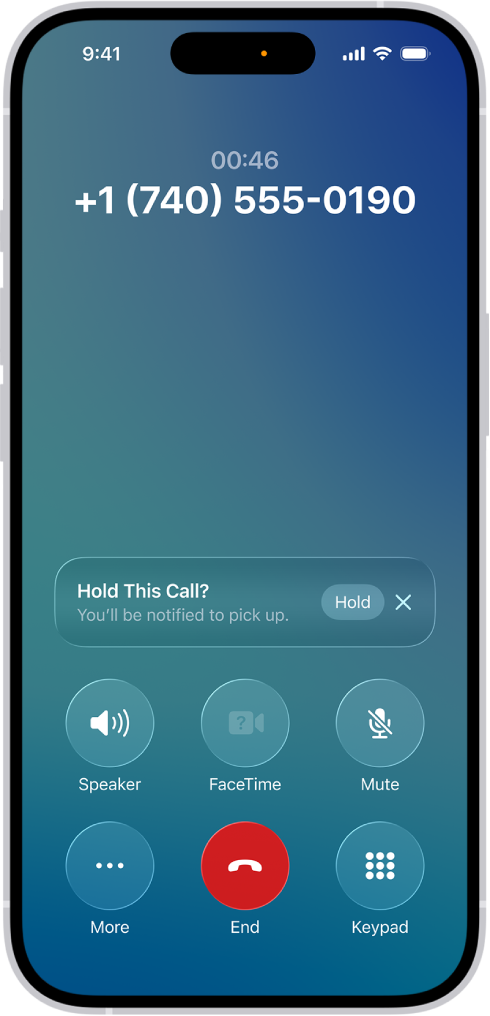
The Hold Assist feature is another highly anticipated addition to the Phone app for those who are tired of listening to lengthy hold music. This smart feature saves them from enduring that frustration by having the iPhone monitor the call until the hold ends and a real person answers.
Hold Assist sends a notification the moment a real person returns to the line, meaning that users can multitask and even step away from their device while waiting.
The Phone app also features a cleaner, more intuitive, and unified layout. Favorites, Recents, and Voicemails now appear together on a single screen, streamlining how calls and messages are managed.
While the change is simple, the redesign eliminates the need to jump between tabs, making it faster and easier to find contacts, check missed calls, and stay organized.
iOS 26 further expands the Phone app’s capabilities with the introduction of “SharePlay” for regular voice calls. This allows users to share video, music, or documents without using FaceTime, turning any phone call into a more interactive experience.
The update also introduces several smaller enhancements. Voicemails, for instance, now include automatic summaries that offer a quick preview of the message without requiring a full listen, as well as the ability to report them as spam.
Additionally, eSim setup can now be automatically deactivated once a user is no longer traveling internationally. Finally, Apple has added new Monogram styles for contacts, providing a personalized, stylish look to call screens.
Modernized Messaging
The Messages app is arguably the most used iPhone app, so it is no surprise that it also gets a major update in iOS 26, introducing features that make conversations more fun, expressive, and organized.
By enhancing personalization and group interactions, Apple is giving users more creative control over the look and feel of conversations. Some of the improvements include smoother navigation, updated management tools, and a refreshed interface, offering a more intuitive and dynamic way to connect with others.

The new conversation backgrounds feature, which allows customization of each chat with unique visuals, stands out among the many new features. Users can choose from Apple’s curated collection or upload their own photos, and everyone in the conversation can see the shared design. Backgrounds can be turned off in Settings for a cleaner look.
Users can now create polls within group chats to quickly get opinions or hash out plans. Apple Intelligence can also detect when a poll might be useful in a conversation and automatically suggest creating one.
Other upgrades include enhanced Apple Cash support for sending and receiving money directly through group messages, enhanced typing indicators that show which group participants are typing a response, and a new Add Contact button that makes it easier to save new contacts from group chats.
Text editing in message bubbles is now more precise and user-friendly. A new “Select” option appears when a user taps and holds a message, allowing the user to highlight the entire message or select just a portion of the text within the bubble.

Enhanced message filtering is another iOS 26 feature that is now smarter and more customizable, especially for users who enable “Screen Unknown Senders.”
Incoming messages are automatically sorted into new categories like Time-Sensitive Alerts, Personal Messages (from businesses or organizations), Transactions, and Promotions. These filters can be toggled on or off, giving more control over unwanted texts and spam.
Apple has also improved how shared photos, links, documents, and other content are displayed within conversations. When a contact’s name is selected, an overview of everything shared in the thread is cleanly organized, making it easy to find past media and attachments.
More Capable AirPods
The iPhone itself is not the only thing that gets an upgrade with iOS 26, as some of the enhanced functionality extends to its popular peripherals, particularly Apple’s AirPods.
Paired with new firmware updates that expand their functionality and help them better integrate with the iPhone, the AirPods now operate more reliably across apps and devices, providing a more convenient, personalized experience within the Apple ecosystem.
One notable feature is “Auto-Pause for Sleep.” This intelligent capability automatically pauses audio playback when the user has fallen asleep, preventing unnecessary use and conserving battery life.
Since AirPods themselves don’t have built-in sleep tracking, this feature is expected to use data from a connected Apple Watch or, potentially, new sensor-equipped AirPods models.
Another significant upgrade is the Camera Remote feature, which turns AirPods into a trigger control for photo and video. By squeezing the stem of their AirPods, the user can remotely capture photos or start and stop video recording on the iPhone.
This works when using Apple’s Camera app and compatible third-party apps, making it easier to take group photos and stable shots on a tripod.
As noted earlier, AirPods now also support Live Translation, allowing for real-time language translation during face-to-face conversations. The translated speech plays directly into the user’s ears, eliminating the need to check the screen constantly.
This feature is available on AirPods 4, AirPods Pro 2, and AirPods Pro 3, turning them into a personal interpreter for use while traveling abroad or in professional multilingual settings.
Call quality receives a significant boost with a new “studio-quality microphone mode” for AirPods. This feature, which has parallels to the Audio Mix capability on iPhone 16 Pro models, is engineered to deliver a more natural vocal texture and improved clarity for standard phone calls, FaceTime calls, and other calling applications, such as Zoom.
This improvement ensures the user’s voice is transmitted with professional-grade clarity, regardless of the communication platform, for both personal and professional interactions.
Apple also finally addressed a long-requested user feature in iOS 26: the ability to manually install AirPods firmware updates. Historically, these updates happened automatically and silently, offering little transparency. Now, users can choose when to install firmware, ensuring their devices stay current on their own schedule.
Finally, Apple refined the ability to use AirPods as an external microphone for video recording, which significantly improves sound quality compared to the iPhone’s built-in mic in many situations.
Photo and Video Upgrades
The Camera app receives significant upgrades in iOS 26, allowing for more seamless photography and videography.
These enhancements focus on clarity, ease of use, and intelligent automation, ensuring that taking photos and videos feels faster, cleaner, and more intuitive than ever.
A particularly innovative new feature is the lens cleanliness detector. This alerts users when the camera lens is dirty and prompts them to clean it.
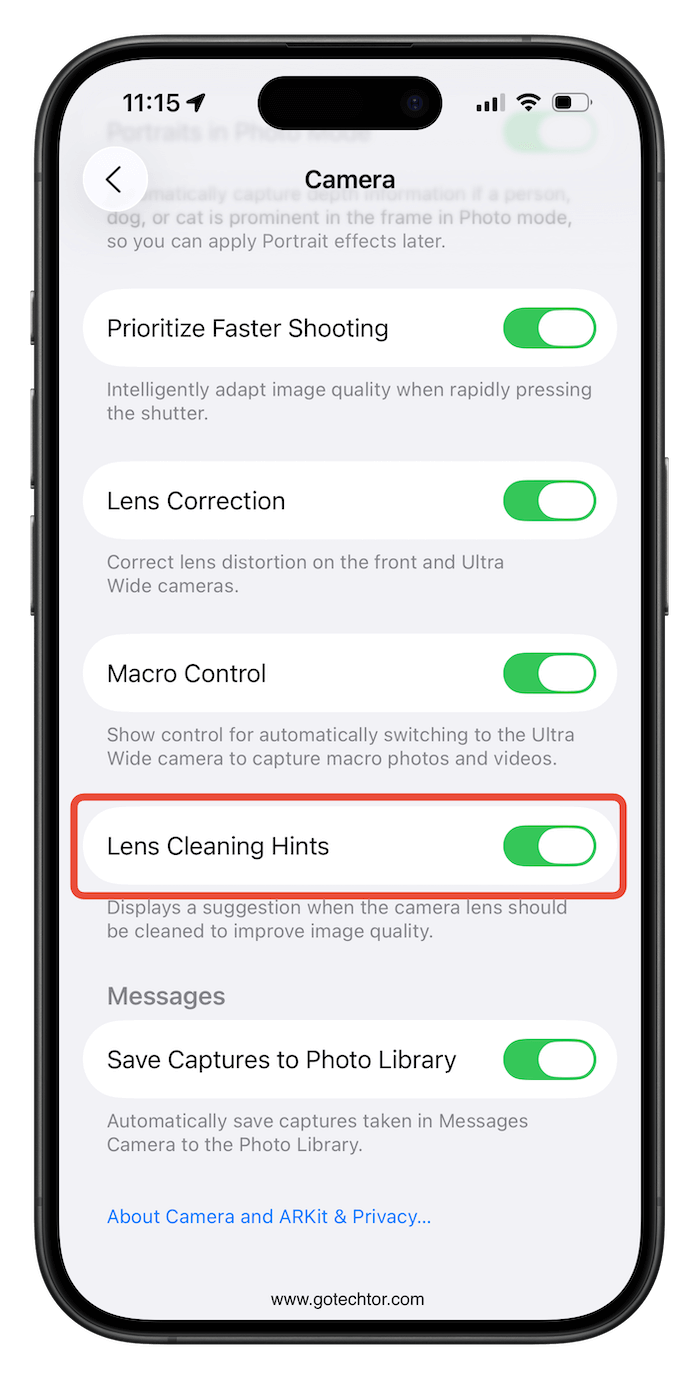
This proactive approach detects dust or fingerprints before shooting, saving users from disappointing results and helping deliver consistently vibrant photos without having to manually check the lens.
As already noted in the AirPods update section, the Camera app now supports remote control via AirPods, allowing users to snap photos or start and stop video recording with a simple squeeze of the stem.
This convenient, hands-free control is great for self-portraits and group shots, as it eliminates the need for timers or remote accessories.
The Camera interface has also been redesigned for more sensible navigation, incorporating new pop-out menus that group advanced settings under contextual panels.

Only the Photo and Video modes are seen by default, keeping the interface minimal. Tapping these icons then opens related tools in neat, floating menus that match the Liquid Glass aesthetic.
Smarter, Longer Lasting Battery Life
iOS 26 brings serious upgrades to battery management, aimed at improving power efficiency and extending the iPhone’s lifespan. These improvements go far beyond the classic low-power mode toggles.
With new automation and better insight into power use, Apple makes battery management simpler and more effective than ever.
The prominent Adaptive Power Mode feature determines when energy use can be decreased without disrupting performance.
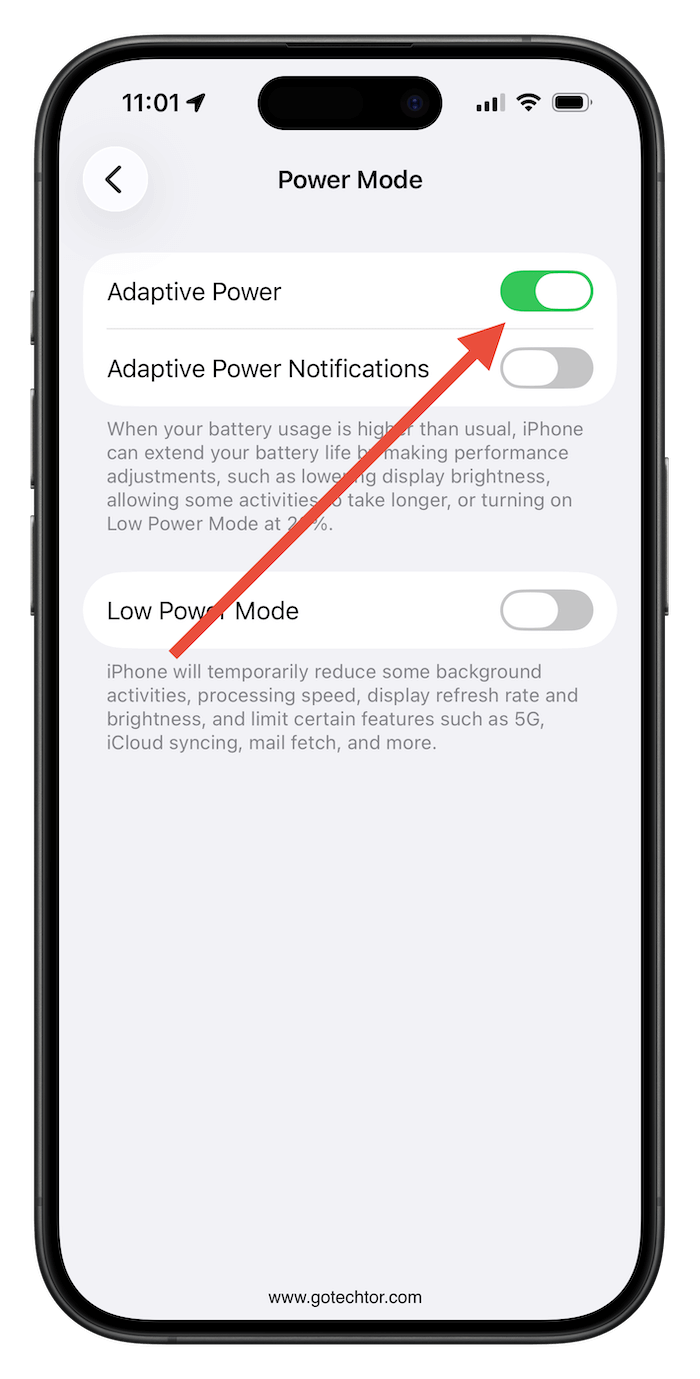
Rather than waiting for Low Power Mode to be enabled manually, it automatically adjusts brightness, suppresses background tasks, and optimizes system performance based on real-time activity.
Once the battery drops to 20%, Low Power Mode is automatically enabled to conserve power. For now, this feature is only on the iPhone 15 Pro and newer devices, but it’s a great sign for future models. Adaptive Power Mode needs to be enabled in the Battery settings, but once it is, power management becomes nearly invisible to the user.
In addition to Adaptive Power Mode, iOS 26 provides users with more transparent and pertinent information about their device’s power status. When the iPhone is plugged in, users can now see exactly how long it will take to fully charge.
This seemingly minor yet highly practical detail helps users plan their charging cycles more effectively. This feature is particularly important for travelers or those with busy schedules, as it provides tangible information at a glance.
The Battery interface itself has also been completely redesigned to be clearer and more detailed, now displaying trends, highlighting which apps eat up the most power, and presenting this data more intuitively.

This provides users with insightful information they can leverage to make smarter, more energy-conscious decisions, helping maintain consistent performance.
A Digital Wallet Hub
The Wallet app in iOS 26 becomes a comprehensive hub for payments, personal identification, travel documents, and financial tools. These upgrades reflect Apple’s goal of replacing physical cards and paperwork with seamless, trustworthy digital alternatives.
A particularly noteworthy new feature is digital passport support, which allows users to store a verified digital version of their passport directly in Wallet. This enhancement is sure to ease international travel and speed up identity verification in the future.
While global adoption will require revised security protocols and buy-in from countries worldwide, Apple’s new framework is laying the groundwork for its eventual adoption.
Travelers will also appreciate enhanced boarding passes that now display real-time updates, such as gate changes and flight delays. That way, they can stay informed without switching apps.
The Wallet app can now also track emailed orders, making purchases and delivery updates viewable directly inside the app.

Aside from travel needs, iOS 26 improves card management by letting users easily save physical card details directly in Wallet.
This can be done by quickly scanning or entering card information and using it across Apple Pay and other connected services. The app even lets users filter promotional alerts, so they only receive payment confirmations and security notifications.
Wallet now provides better access to AutoFill cards, making payment additions or updates simpler, streamlining online purchases and subscriptions while boosting account security.
A Newer CarPlay Experience
Apple’s CarPlay receives a major overhaul in iOS 26, enhancing navigation, communication, and media control, while continuing Apple’s strict commitment to safe driving.
These improvements make CarPlay feel even more like an iPhone extension: streamlined, intuitive, and designed to reduce driver distractions.

Some notable upgrades concern messaging and call management. Drivers can now access pinned conversations directly on the CarPlay screen, so important chats are within easy reach.
Incoming calls no longer disrupt navigation or media playback; instead, they appear in a new compact view. The clean layout minimizes clutter, keeping essential driving information the primary focus and promoting safer driving.
The CarPlay Dashboard now includes “Live Activities,” which display real-time updates on flight times, food deliveries, and sports scores directly within the car’s interface. This keeps users from having to glance at their phones, increasing convenience and decreasing driving distractions.
Extending its utility and personalization, the standard version of CarPlay now includes a dedicated “widgets screen.” This screen can display various informative widgets, such as upcoming calendar appointments or intuitive controls for HomeKit accessories, effectively turning the vehicle into a smart-home management system.
Previously, some advanced widget functionalities might have been restricted to specific, higher-end CarPlay Ultra systems, but now they are more broadly accessible, enhancing the car’s role as a true extension of their digital life and connected home.
Another significant addition is AirPlay streaming. This allows passengers to mirror videos wirelessly from an iPhone onto the CarPlay display.
While the idea of a driver watching videos while driving seems counterintuitive to Apple’s safe-driving mentality, don’t worry: this feature is designed for use only when the vehicle is parked, to prevent boredom during downtime and not as a dangerous distraction.
Separately, the new Liquid Glass design brings translucent, fluid visuals to CarPlay, creating a modern aesthetic consistent with iOS 26’s refreshed interface.
Various Other Updates
iOS 26 isn’t just about transformative redesigns. It also features many other smaller, yet meaningful enhancements across the system. These updates include new apps, smarter integrations, and thoughtful quality-of-life improvements that vastly enhance typical iPhone use.
One fun addition that should excite gamers is the new Games app, which serves as a hub for all gaming activity, consolidating the iPhone’s game library, Game Center data, and App Store access in one sleek interface.
The app also features curated gaming content and, in some cases, supports non–App Store games for Mac users.
The Photos app has been redesigned to include new Library and Collections layouts. The interface offers a more intuitive, cleaner way to organize the photo library.
A new 3D spatial effect for favorites has been added, allowing selected images to display depth and motion on compatible devices.

One of the most requested features in the Notes app has been the ability to export notes as Markdown files, particularly for users who prefer plain-text formatting for documentation, coding, or writing.
Apple has obliged, offering this thoughtful enhancement that ensures compatibility with Markdown supporting platforms across various devices and workflows.
The Reminders app has been updated to include a Control Center button for instant task creation or management without opening the app; meanwhile, a long-awaited customization option that allows 1 to 15 minute snooze durations has been added to the Clock app.
The Safari browser now also has new flexible layout options (Compact, Bottom, and Top), allowing interfaces to be arranged to suit any user’s browsing style.
Even more impactful is that Safari now enables advanced fingerprinting protection by default, blocking websites from collecting identifying data about your device, a feature sure to gain a lot of love from the data privacy sphere.
There are also upgrades to screen-capturing tools for improved image quality and workflow efficiency.
Unlike in previous iOS versions, screenshots can now be captured in HDR, retaining vivid color and sharper contrast. Users who take many screenshots can now also disable full-screen preview thumbnails.
These updates improve both the visual quality of screen captures and the speed of their collection.
A new accessibility setting is also introduced that allows users to reduce loud iPhone sounds, benefiting those who are sensitive to sudden loud noises.
Meanwhile, the home bar has been refined to appear briefly when launching an app, then disappear, leaving a screen with more space and fewer distractions.
iOS 26 also goes further to keep users informed, even when connectivity is challenged, with Satellite Weather, which delivers crucial weather updates even when cellular or Wi-Fi signals are unavailable.
There are also improvements to Dictation, allowing users to spell names or words with better accuracy when transcribing unique or technical terms.
Additionally, the Settings app now includes a dedicated list of blocked contacts, simplifying management of unwanted communications..
The Journal app now allows users to create multiple journals, ideal for organizing entries by topic, project, or life area. Entries now appear on a contextual map, so users can visualize where memories occurred and add photos to illustrate their stories.
The Passwords app now includes password history, allowing users to view old credentials for auditing, tracking, or recovery.
Connectivity also receives several boosts: iOS 26 introduces full support for Wi-Fi Aware and the ability to sync captive Wi-Fi login details across Apple devices, so credentials do not need to be re-entered.
For users sensitive to motion, Accessibility provides vehicle motion cues designed to reduce motion sickness when using an iPhone in a moving car. Satellite Weather also delivers crucial weather updates when cellular or Wi-Fi signals are unavailable.
Finally, the Preview app, Apple’s macOS staple, is making its way to iOS and iPadOS. This powerful tool will let users view, edit, and annotate PDFs and images directly on their mobile devices, going far beyond what Notes or Files currently offer, in a major leap for productivity and file management.
Timing and Device Compatibility
iOS 26 introduces new device compatibility features to ensure its advanced tech, including Liquid Glass and Apple Intelligence, runs smoothly across all supported hardware, ensuring consistent performance.
The core iOS 26 update supports devices starting with iPhone 11 and newer, covering all models up through the latest iPhone 17 series, except for the iPhone XR and iPhone XS.
This decision follows Apple’s standard hardware cycle and is necessary due to the new system’s higher graphical and computational demands. The newer devices are compatible because they are guaranteed to deliver a fluid, visually rich experience.
For full transparency, not every eligible device will have access to every new capability or feature. The most powerful Apple Intelligence features (Visual Intelligence, Genmoji creation, and AI Shortcuts) are exclusive to the iPhone 15 Pro, 15 Pro Max, and all iPhone 16 and 17 models.
This is because these devices use advanced chipsets with specialized neural engines that handle complex AI processing locally, a key factor in both performance and privacy preservation.
The smart new Adaptive Power Mode also requires newer hardware, which is only available on the iPhone 15 Pro and later models. This is because it requires advanced real-time monitoring and energy optimization components found only in recent devices. These systems dynamically manage performance, improving efficiency without noticeable performance sacrifices.
The numbering scheme itself, where Apple made a significant leap from iOS 18 to iOS 26, is an integral part of a broader, strategic initiative to unify the numbering across all of its operating systems.
This deliberate change means that sister operating systems such as iPadOS, macOS, watchOS, and tvOS will also consistently carry the “26” designation, collectively signifying the 2025-26 release season across the entire Apple product lineup.
This unified versioning aims to reduce historical confusion arising from numbering schemes that did not align across all of Apple’s operating systems and to help usher in a clearer, more cohesive identity for Apple’s software ecosystem moving forward.
The Bottom Line
Apple’s jump from iOS 18 to iOS 26 represents a strategic effort to unify version numbering across all major operating systems.
Going forward, iPadOS, macOS, watchOS, and tvOS will all share the same “26” designation, representing the 2025–2026 update season, eliminating past confusion among platforms and validating Apple’s vision of a cohesive ecosystem across every device category.
Together, these sweeping updates from the foundational Apple Intelligence suite to the unified versioning signal Apple’s most ambitious move yet to transform the iPhone from a simple device into a dynamic, personalized, and intelligently managed hub for users’ entire digital lives.
