

Apple has a habit of fixing small annoyances in ways that are easy to miss unless you spend a lot of time digging through Settings.
iOS 26.4 includes one of those quiet changes that probably will not show up in a keynote slide, but it actually matters if you record a lot of video on your iPhone.
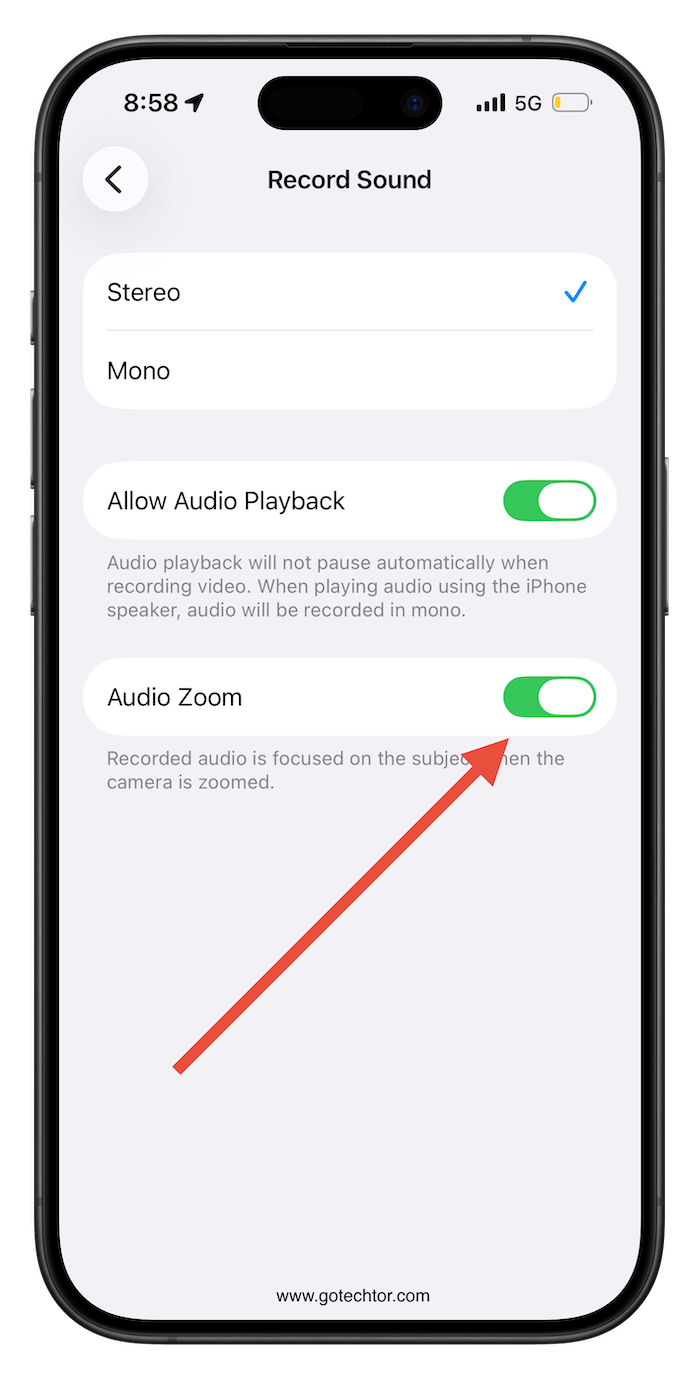
The change is a new toggle for Audio Zoom. If you have never heard of Audio Zoom, you are not alone. The feature automatically focuses the iPhone’s microphones on whatever you zoom in on while recording video.
In theory, it helps isolate a subject in noisy environments such as concerts, sporting events, or busy streets. In practice, it can sometimes make videos sound oddly narrow and remove the background sound that makes a scene feel real.
Until now, Audio Zoom has mostly worked in the background. Many people probably did not even realize their phones were changing how audio was recorded when they zoomed in.
In iOS 26.4, Apple added a dedicated toggle to turn Audio Zoom on or off. You can find it in Settings under Camera, then Record Sound.
Apple has spent years making the camera smarter with automatic processing, smart HDR, stabilization, and computational photography.
Most of the time, the iPhone decides how your photo or video should look and sound. Now we are seeing more situations where Apple gives users a switch to decide for themselves.
It also shows how much of the iPhone experience is now controlled by software decisions that most people never see.
Features like Audio Zoom can completely change how your video sounds, yet they live quietly in the background until Apple adds a setting like this.
If you shoot video often, especially at events or outdoors, this new toggle is worth checking. Turning Audio Zoom off can make your videos sound more natural and capture the full atmosphere of a place instead of just the subject you zoomed in on.

