
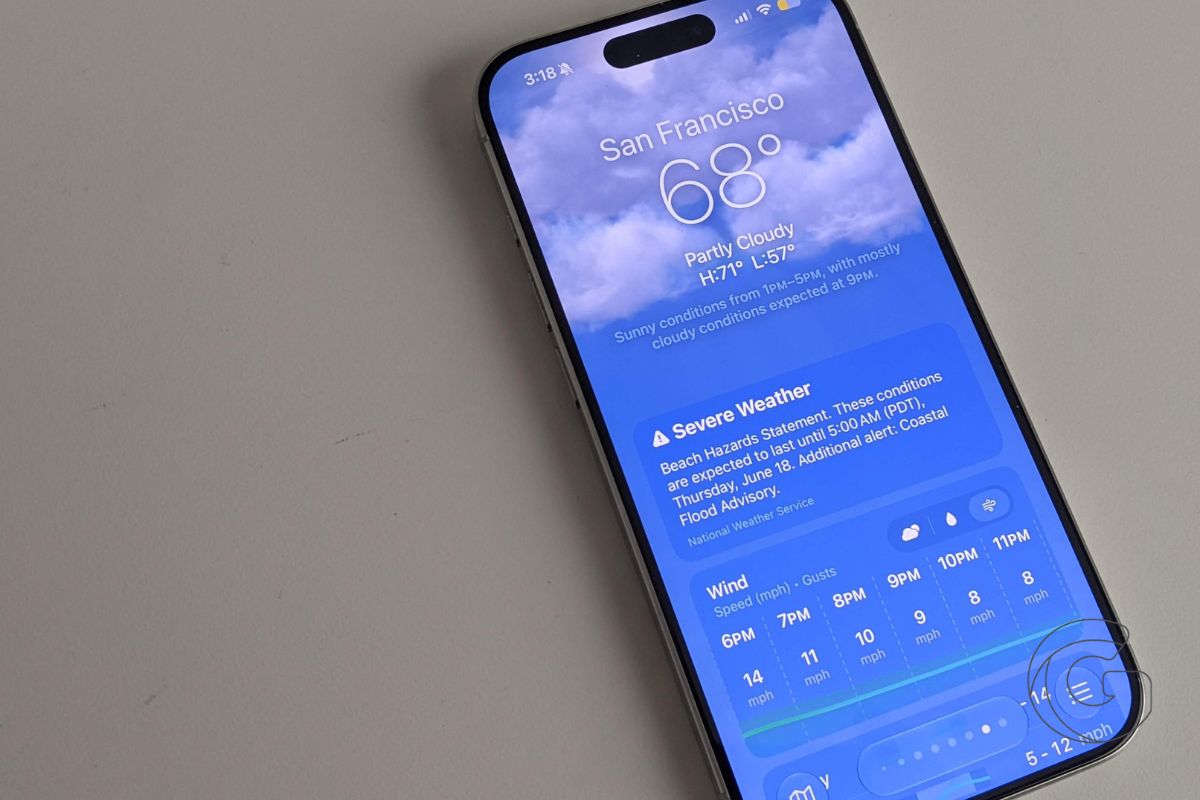
Apple’s Weather app got a quiet but meaningful overhaul in iOS 27, which rolled out this week, adding tabbed forecasts, a new written summary section, and a larger Home Screen widget option.
The most visible change is a set of three new tabs that appear within the current-day forecast:
- Conditions
- Precipitation
- Wind
Tapping between them surfaces more granular hourly data for each category, along with graphics showing what to expect over the following days.
Previously, that level of detail required more scrolling or a third-party app. Now it’s organized in one place, broken out by what most people actually want to know: how hot or cold it’ll be, whether to carry an umbrella, and how hard the wind is blowing at any given hour.
A summary that reads the day for you
iOS 27 also adds a “Highlights” section near the top of the Weather app’s main screen.
Rather than requiring users to parse hourly charts, it delivers a short written summary of anything worth knowing about that day’s weather, such as when rain is expected to arrive or when temperatures are likely to shift significantly.
It’s a small feature, but it addresses a genuine usability gap: quickly scanning conditions without reading through a full forecast.
Apple hasn’t said whether the Highlights text is generated using the same on-device AI infrastructure powering the updated Siri in iOS 27, but the functionality fits the broader direction the company has taken with its intelligence features this cycle.
A bigger widget for those who want it
For users who rely on the Weather widget on their Home Screen, iOS 27 introduces a fourth size option: an extra-large widget that can fill an entire Home Screen page.
The previous maximum was a large widget. The new size displays more forecast data at a glance, though how useful it is will depend on how much Home Screen real estate someone is willing to trade.
The Weather app changes arrive alongside more prominent iOS 27 additions that have received wider attention, including a redesigned Siri with a more conversational interface, enhanced photo-editing tools, and a three-band equalizer for AirPods.
Apple has been incrementally upgrading its built-in apps over the past several releases, and the Weather app, which ships on every iPhone, has been a recurring target for those refinements.
iOS 27 is available now as a free update for compatible iPhones.

