

iOS 27 fixes a Lock Screen annoyance I’ve had for years: the Now Playing widget that refuses to disappear after I’m done listening to music or watching a video.
Previously, the playback controls could linger on the Lock Screen long after media stopped playing, taking up valuable space until iOS eventually removed them on its own.
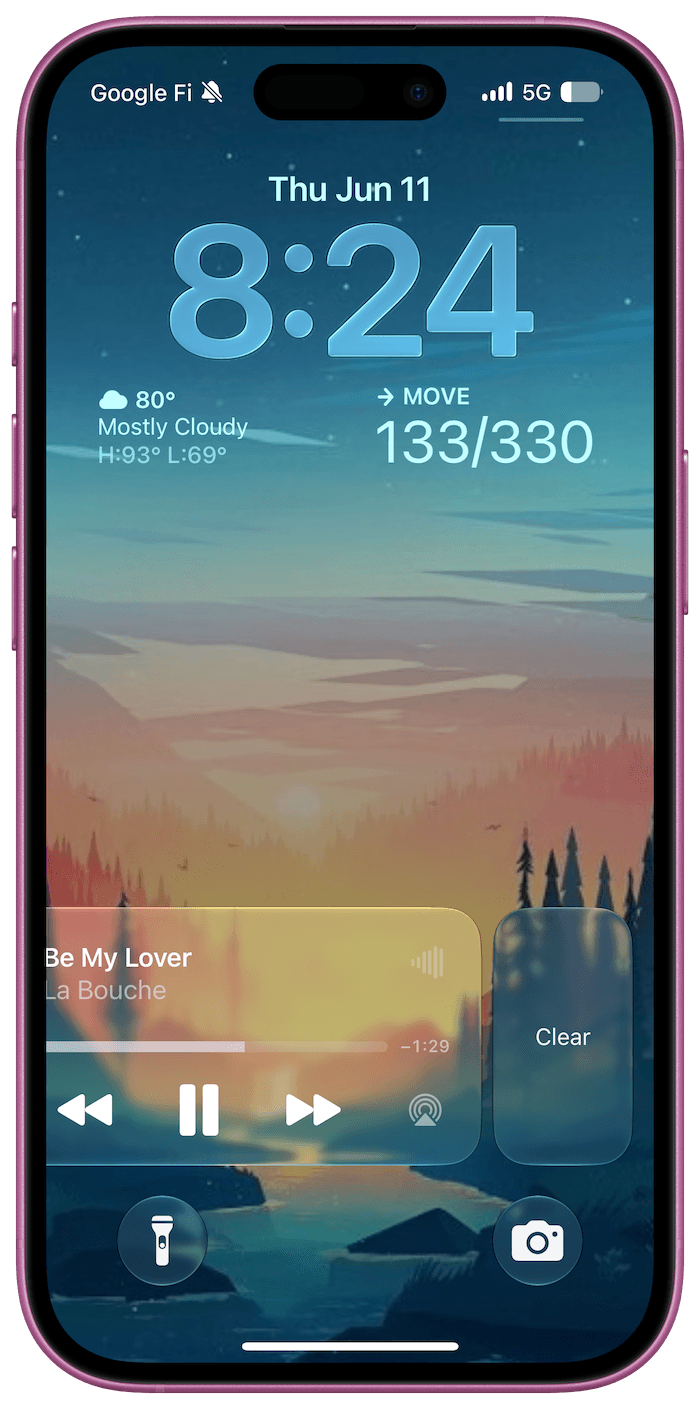
You can finally dismiss the widget yourself, and it takes just a swipe and a tap.
How to Remove Now Playing From Your Lock Screen
When the playback controls are still showing after you’ve stopped listening or watching, here’s how to remove them:
- Swipe left on the Now Playing widget on your Lock Screen.
- Tap Clear.
The widget disappears immediately, along with the corresponding Now Playing indicator in the Dynamic Island.
I’ve always found this limitation strange, considering how much control Apple gives us over the Lock Screen.
You can customize wallpapers, fonts, widgets, and shortcuts, yet there was no straightforward way to remove media controls once they appeared.
During my early testing, I also noticed that bringing the widget back after dismissing it wasn’t always predictable.
Switching between media apps or restarting playback usually restored it, although the behavior wasn’t entirely consistent in the developer beta.
Being able to clear the widget manually is a welcome improvement, particularly when playback has ended, but the controls are still taking up space on the Lock Screen.

