

Unwanted phone calls have become a constant annoyance. Robocalls, fake delivery alerts, and scammers posing as banks or government agencies interrupt everything from work meetings to family time.
It’s no surprise that spam calls remain one of the most common consumer complaints tracked by the Federal Communications Commission.
With iOS 26, Apple introduced a built-in solution that gives iPhone users more control over those interruptions.
The update includes a new “call screening” feature that lets Siri handle unknown callers before your phone ever rings.
How iOS 26 Call Screening Works
When call screening is enabled, Siri answers calls from numbers that aren’t saved in your contacts.
Instead of immediately ringing your phone, Siri asks the caller to identify themselves and explain why they’re calling.
As the caller responds, their answers are transcribed on your screen in real time. You can then decide what to do next: answer the call, ask Siri to follow up with another question, or decline the call altogether. The idea is to give you context before you engage, not after.
This approach cuts down on the familiar “Hello? Who’s calling?” exchange and makes it easier to spot suspicious calls quickly.
Turning On Call Screening in iOS 26
The feature isn’t enabled automatically, so you’ll need to turn it on manually.
Start by confirming your iPhone is running iOS 26. Open Settings, tap General, then Software Update. Once updated, go back to Settings, select Apps, tap Phone, and scroll to Screen Unknown Callers.
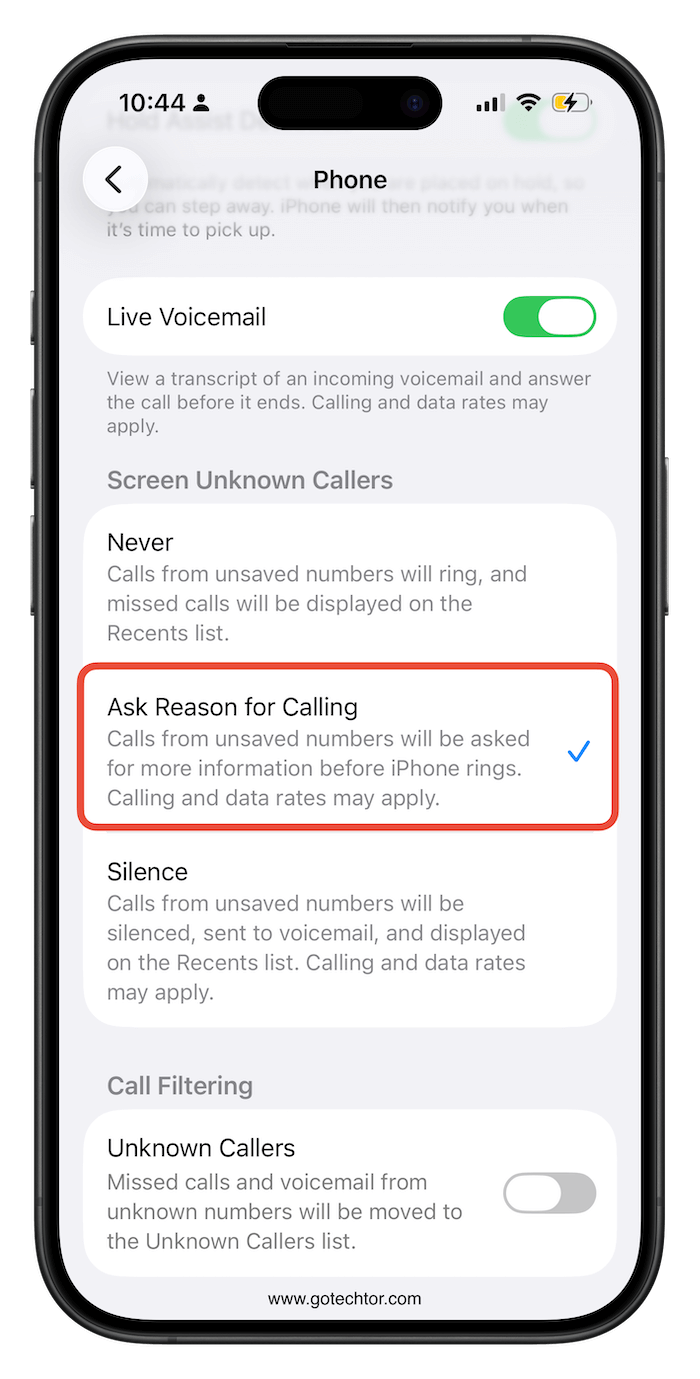
You’ll see three options:
- Never: Unknown callers ring through as usual.
- Ask Reason for Calling: Siri screens unknown callers and shows you a transcript before the phone rings.
- Silence: Calls from unsaved numbers are sent straight to voicemail and appear in your Recents list.
Each option offers a different balance between accessibility and minimizing interruptions.
Why “Ask Reason for Calling” Makes Sense
For many people, silencing every unknown number isn’t practical. Medical offices, delivery services, and schools often call from unfamiliar numbers.
The Ask Reason for Calling option offers a middle ground, letting legitimate callers explain themselves while discouraging scammers who prefer quick answers.
You can also combine call screening with other tools, such as registering your number on the FTC’s Do Not Call Registry, to further reduce unwanted calls.
If spam calls regularly disrupt your day, iOS 26’s call screening feature is easy to enable and worth trying. It puts you back in control without forcing you to miss important calls.


My iPhone 16pro in Vietnam did not have Screening call function
This doesn’t make sense? It used to be so easy to block calls. Now it is impossible.