

I rely on screenshots more than I’d like to admit. They’re where I stash important messages, things I want to come back to later, quick reminders, and the random bits of information I don’t want to lose.
For a lot of iPhone users, screenshots aren’t just imagesthey’re a lightweight way to remember things without thinking too hard about it.
That’s why a small change in iOS 26 has been so irritating. After installing iOS 26, taking a screenshot no longer works the way it used to.
Pressing the Side button and Volume Up still captures the screen, but instead of saving it immediately to Photos, iOS now pauses the process.
A full-screen preview appears and asks what you want to do nextcopy it, delete it, save it to Files, or manually save it to Photos.

That extra decision point may not sound like much, but it adds friction to something that used to be instant. If your habit is to screenshot now and sort later, this change slows you down every single time.
The good news is that Apple didn’t fully remove the old behavior, it’s just hidden behind a setting.
Follow these steps to restore automatic screenshot saving.
- Open the Settings app.
- Go to General.
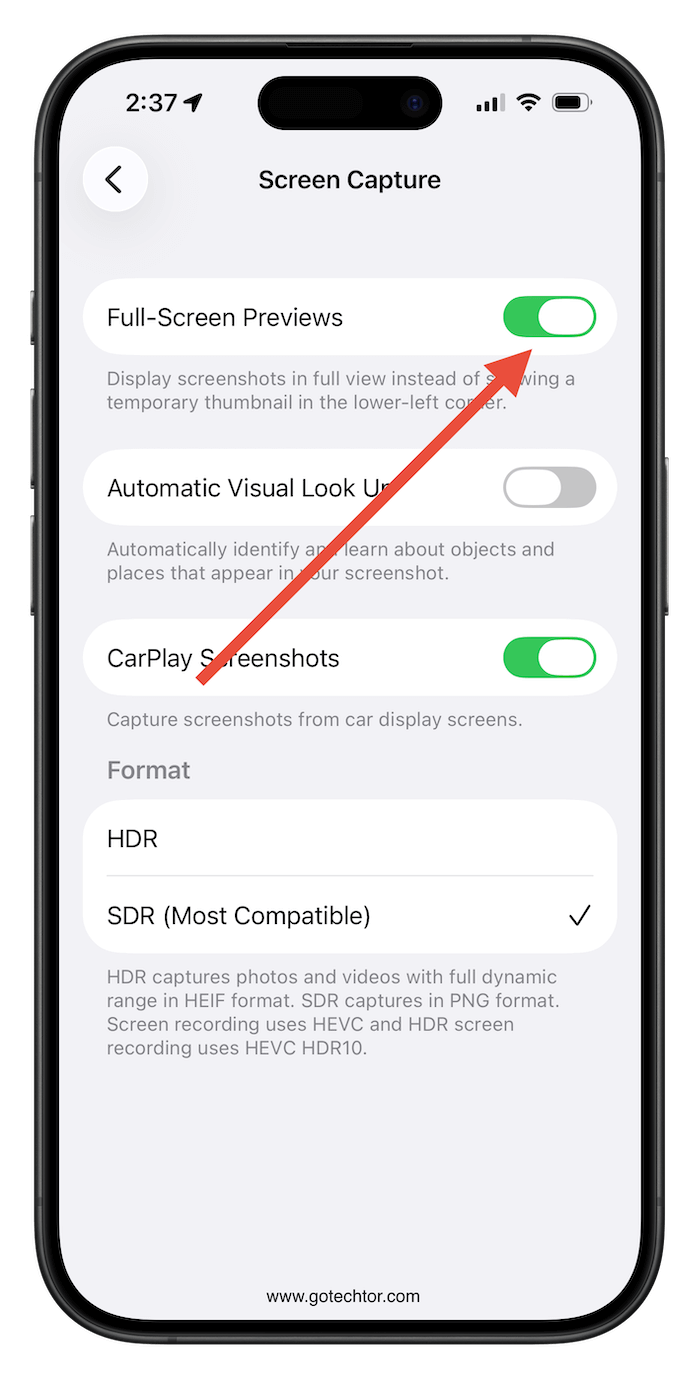
- Look for Screen Capture.
- From there, turn off Full-Screen Previews.
Once this option is disabled, screenshots behave as they did before: a small thumbnail will briefly appear, and the image will save directly to your Photos library without any extra prompts.
If screenshots are your go-to for keeping track of information, you probably want them to stay effortless.
Disabling Full-Screen Previews is a simple fix that restores that convenience and makes screenshotting feel familiar again.

