

iOS 27 adds a small keyboard shortcut that makes one of the most common things you do on an iPhone noticeably quicker.
Whenever you copy text, a link, or an image, a paste button can now appear above the keyboard the next time you tap into a text field.
Instead of pressing and holding the screen, waiting for the editing menu, and tapping Paste, you can paste whatever you just copied with a single tap.
It’s the kind of iOS 27 feature that’s easy to overlook, but I’ve found myself using it constantly since updating.
Your clipboard now appears above the keyboard
Copy something on your iPhone, open another app, and tap into a text field. The keyboard shows what you just copied along with an option to paste it.
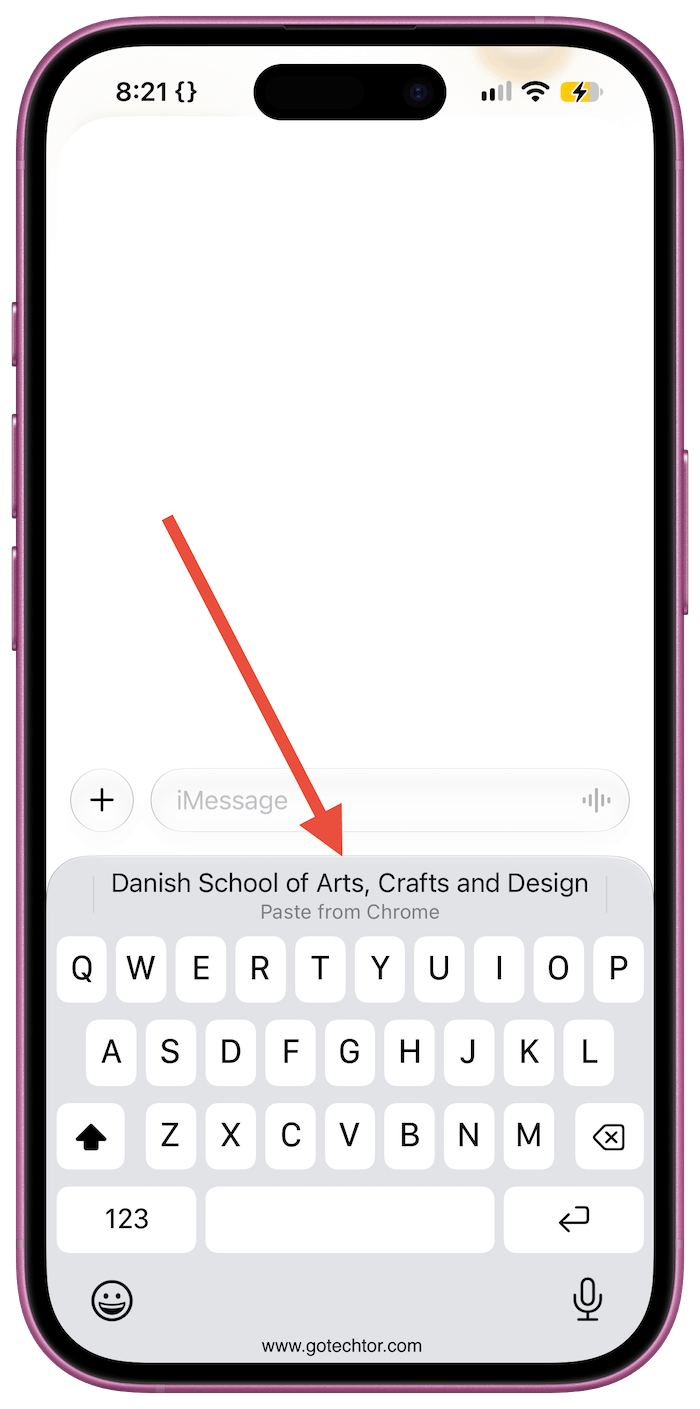
For text and links, you can see a preview of the clipboard contents before pasting. If you copy an image, a small thumbnail appears instead. Tap it to insert the content immediately.
The shortcut works across apps, so you can copy a link from Safari and paste it into Messages, grab text from Mail and drop it into Notes, or move an image into another app without opening the usual editing menu.
You don’t need to enable anything in Settings. The suggestion appears when iOS detects something on your clipboard you may want to paste, and it gets out of the way when you don’t need it.
You can still paste the old way by pressing and holding inside a text field and selecting Paste. iOS 27 simply gives you a much faster option when you’ve just copied something.
I’ve been using iOS 27’s bigger additions since the update arrived, but this is one of those small changes that quickly becomes difficult to give up.
Copy and paste hasn’t fundamentally changed. Apple just removed a few taps from something you probably already do every day.

